
![[spacer image]](/images/spacer_white.gif)
Hardware
Q: How many wireless sensors can be supported by a Wireless Gateway?
A: Our wireless gateways can support up to 100 sensors each. To expand a network beyond 100 sensors, simply add another wireless gateway to the network and continue expanding.
Q: Can I add additional sensors to the wireless sensor network at a later time?
A: Yes. You may expand your network as needed, up to 100 sensors per wireless gateway. You can add an unlimited number of wireless gateways, so you are not limited to the amount of wireless sensors you can have on your account.
Q: What frequencies do the wireless sensors communicate on?
A: Monnit / OEM Sensor’s wireless sensor networks currently operate on the ISM 900MHz (902-928MHz) band as well as 868MHz and 433Mhz bands.
Q: How is sensor data protected during wireless transmission?
A: Our wireless communication technology provides several features to help protect your data in transit. Our proprietary sensor protocol uses very low transmit power and requires specialized radio equipment to operate. Typical wireless devices that operate on non-proprietary communication protocols (Wi-Fi, Bluetooth, Zigbee) operate using different frequency bands so they can't be used to eavesdrop on the radio communications from from our wireless sensors. In addition we use a robust packet tampering evaluation routine to ensure that traffic wasn't altered between the sensors and the gateways. This enables us to check for well-formed data packets that only originated from the wireless sensor. To further protect data we have algorithms that protect against spoofing and re-transmission of wireless data packets. This is included with the best in class range and power consumption protocol developed for our wireless sensor systems.
Q: What is the average life span of the battery in the wireless sensors?
A: The life span of the battery is dependent on a number of factors: how frequently the sensor transmits data (heartbeat), how far the sensor is from the wireless gateway and obstructions that could cause difficulty in sending data (farther distance and obstructions require that the radio to operate at longer intervals to send and receive data). We estimate through normal usage a sensor in the field should last ~ 1-2 years before it needs to be replaced.
Q: What should I do with my wireless sensor when the battery dies?
A: With our standard sensors, once the coin cell battery has been depleted, you can change the battery by peeling the sticker away from the battery slot then use a paper clip or small screwdriver to push the battery out and replace with a new CR2032 coin cell battery. With AA battery type sensors, simply slide the battery compartment door open to access the batteries. We encourage you to recycle all old batteries.
Q: How do I set-up a static IP address on my Ethernet gateway?
A: For detailed instructions on setting up a static IP address on your Ethernet gateway, please visit http://community.imonnit.com/Setting-a-Static-IP-Address-on-Monnit-Ethernet-Gateway.ashx.
Q: What do I need to have in my possession to run a Monnit / OEMSensors wireless sensor network (WSN)?
A: To deploy a standard wireless sensor network, you will need a wireless gateway and any wireless sensor(s) that are needed for your application.
If using our Wi-Fi sensors, no wireless gateway is needed. All you need to have is an existing Wi-Fi network in range of the Wi-Fi sensors for them to communicate with the online sensor monitoring system.
If using a USB wireless gateway, you will need to have a Windows PC with Internet access to transmit the sensor data to the online sensor monitoring system.
Q: Should I expect interference from other wireless networks (Wi-Fi, walkie talkies, cordless phones, cellular phones, radios, etc.) operating in the vicinity of my wireless sensor network (WSN)?
A: No. Our wireless sensors currently operate in the 900Mhz ISM band. Most wireless sensors today operate in the crowded, 2.4Ghz space where cell phone, WiFi networks, wireless telephones, and many wireless accessories for networks and PCs operate.
We chose the 900Mhz frequency for its performance characteristics (much better range through obstacles than 2.4Ghz) and "openness" of the frequency. Operating at 900Mhz limits the ability to deploy sensors to a specific region (North America only).
The chipset used in our wireless sensors also supports 868MHz as well as 433MHz. Support for international markets will utilize these two frequencies for best performance.
Q: Do the gateways look for a clear RF channel when it is powered up? Can it switch channels if noise or interference is high?
A: During testing of sensor networks prior to shipping of the product, the networks are formed and the gateways choose a channel to transmit on. When you receive the product, that channel stays constant until reset by the user.
If you want to have the gateway search for the most clear channel in your environment, you will need to follow these steps:
USB Wireless Gateways
1. Start the gateway software.
2. Insert the USB dongle and wait for the network to go active.
3. Select "Reset Network" within the gateway software and wait for 30 seconds.
4. When network has reformed, begin putting the batteries in the sensors.
Ethernet and Cellular Wireless Gateways
1. Press and hold the control button (until LEDs turn red) to reset the gateway. During reset the gateway will scan for the best channel.
2. Power cycle the sensors by removing batteries, waiting 30 seconds then reinsert. If you do not power cycle the sensors, they will automatically come back online, after entering link mode (two missed communications with the gateway).
Your sensor network is now operating on the most friendly RF channel available in your area.
Q: What are the voltage input requirements for the OEM/RF wireless sensor circuit boards?
A: Monnit / OEM wireless sensors require 2.0 - 3.6 VDC max.
Q: What is the power draw of a wireless sensor?
A: In sleep mode the sensor consumes .5µ Amps and during transmit the sensor consumes 35 mA.
Q: What happens to my wireless sensor network if using a USB wireless gateway and the host computer goes into sleep mode or is powered off for some reason?
A: If the wireless gateway is unable to receive transmissions from the sensors due to the PC being off or asleep, the sensors will continue to try and link with the gateway (two times by default). If it is unable to link to the gateway it will enter “link mode” where it will search for another nearby gateway. If no gateway is found, the sensor enters "power save" mode, and will sleep for two hours before entering link mode again, and search for a gateway. This process will continue until the sensors find a gateway to communicate with.
Note: While the gateway is off, no data is being collected and no notifications can be transmitted.
Q: Does the USB Wireless Gateway need to be plugged directly into the computer, or can I plug it into a USB port expander?
A: If you are using an unpowered USB port expander/hub, the USB Gateway will not operate properly. To insure best performance of the Sensor Network, plug the USB gateway into a powered port expander, or best yet is to plug the USB gateway directly into a USB port on your computer.
Q: How can I extend the range of my wireless sensor network ?
A: The range between wireless sensors and wireless gateways can be extended by using a wireless range extender. A range extender can double the range between the sensors and gateway. Multiple range extenders can be used together to give even further range.
Note: If using more than one range extender, the sensor data traffic double at each unit in the communication chain. This limits the number of sensors supported by the last repeater.
Q: What are the size of the data packets being transmitted by the sensors to the gateway?
A: The application data is 18 bytes in length and the total TX packet size is 40 bytes.
Q: How do I mount the wireless sensors for my particular application?
A: We provide a number of mounting options for the sensor technology. In the deployment kits we have included screws and double-sided tape. These options should allow you to mount the hardware to most any type of material.
Q: My temperature sensor is giving me a reading of -1767.8F (-999.9C), what does this mean?
A: A reading of -1767.8F signifies that the thermistor wires have broken or the battery has not been fully inserted causing a short between the thermistor leads on the sensor board. If this happens; try removing the battery, wait 45 seconds then re-insert the battery making sure to push the battery all the way to the back of the sensor housing. When the sensor comes back online check the reading to see if it has been corrected. If the problem persists you will need to contact customer support at 801-561-5555 for more information.
Q: How do my wireless sensors connect to the monitoring software on the internet?
A: Each wireless sensor comes ready to connect to the wireless gateway upon power up.
If using a USB gateway, make sure that the USB Driver has been installed and the USB Gateway Software is installed and running, then simply insert the USB gateway into the PC. Once the gateway establishes a connection with the online wireless sensor monitoring system and communicates with the servers, simply insert the batteries into their holder on each sensor. The sensor will power up and connect to the wireless gateway and communicate with the online system, assigning each sensor its own unique id number.
Q: Will a wireless sensor notify me when I need to change the battery?
A: Each time the sensor transmits data to the online sensor monitoring system it reports the battery power as well. Notifications can be set to alert you by email or text message, when a sensor's battery is about to expire.
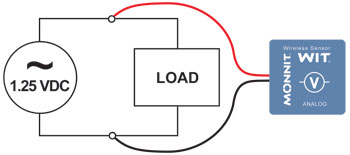
Q: I purchased a voltage detection sensor. What is the proper way to connect this to my power source?
A: If a voltage type sensor is not connected to the power source properly, it will appear that the sensor does not work. Please follow the wiring diagram below to ensure proper performance and detection.
Software
Q: Why can't I edit my sensor settings?
A: Sensor Availability
Because our sensors are battery powered it is critical that customers leave the radio inactive between transmissions to conserve power. A CR2032 battery that can last for a multiple of years transmits a signal every hour or two, thereby conserving power and in return preserves battery life. (The recommended heartbeat is not more than once every hour.)
If transmissions from the sensor are increased and left listening for continual communication, the battery life is impacted harshly (maximum battery life could be as little as approx. 2 hours). This forces the software to pass sensor updates to the sensor only after the sensor has turned on its radio and listens for an acknowledgment. During the acknowledgment, the software can notify the sensor that it has a configuration update and from there the network can communicate the update to the sensor. At this point the sensor acknowledges the configuration update and the software marks the transaction complete (removing the pending transaction flag).
Gateway Lag:
Similar to the sensors, the software can't instantly initiate communication to the gateway. The reason is many firewalls and security measures keep intruders from accessing the customer's network. Out of the box the gateway is configured to communicate with with the online system once every five minutes. (It uses the same communication protocol as your web browser does while communicating to your bank.)
Because of the five minute heartbeat of the gateway there is a lag (delay time) between the time the user saves the configuration settings on the server and the time the gateway checks in to receive the updates. Only after the gateway has acknowledged the updates the sensor checks in and receives them.
Network Stability:
During pending transactions it is impossible for the software to know which stage of the process the configuration is in. For example, if a user has set a configuration change to set the sensor's new heartbeat to 30 minutes, the gateway received the request while the sensor still hasn't.
There are certainly other network stability cases such as if you have modified the configuration to a 3 hour heartbeat to conserve battery life, the following could occur to cause network instability.
The 3 hour change is observed in the software, from here the gateway is ready to talk to the sensor and inform it that the heartbeat should be 30 minutes now. When the sensor checks in and receives the configuration change it will receive the 30 minute heartbeat rather than the 3 hour heartbeat. If the sensor was to communicate up to the server that it has successfully updated its configuration, the software must assume it has been updated to 3 hours and marks the transaction as complete. This is the reason the software marks transactions that require communication with the sensor as "Pending".
To be able to update sensor configurations the user needs to make sure the sensor is communicating well to the online software and wait until the pending configuration completes.
Q: How do I turn OFF/ON email and text notifications for my sensor network?
A: iMonnit has a global feature so you can stop notifications from sending emails and text messages to your devices. To turn this feature on and off, do the following:
1. Login to your account
2. Once logged in, from the top pull-down menu, find and select "My Account"
3. On the left hand side, find "Sensor Networks" and select the edit pencil next to the network for which
you would like to the notifications turned off
4. The second feature down is titled "Send notifications for this Network"
5. If notifications are being sent, deselect the check box. If notifications are NOT being sent, select the
check box.
6. Click "Save"
Q: How do I get my sensors to stop sending alerts to my email or phone when they are inactive?
A: To deactivate a single notification, log into your online account and do the following:
1. Click on "Notifications" from the main menu.
2. From the Notification List (left side of screen), click the envelope icon next to the name of the notification you want to deactivate.
(Green icon means the notification is active, grey means it is inactive.)
3. To reactivate a notification, click the envelope icon again.
To deactivate notifications for entire sensor network, do the following:
1. Click on "Manage" from the main menu.
2. Click on "Edit Network Details" under the sensor networks information section.
3. Uncheck the box for "Send notifications for this network".
(Check the box to reactivate all notifications for the network.)
4. Click "Save."
If you have additional questions regarding this feature, please email us at support@oemsensors.com.
Q: Why do I see two messages of the same type in a row from one of my sensors?
A: One of the strengths of the our wireless protocol is that the sensors can both transmit and receive. After a sensor transmits its data it waits to hear an acknowledgement back from the gateway that the sensor data was received. If the sensor does not hear back from the gateway in a certain period of time it will retransmit the data. By default the sensor will resend up to three times if needed before it goes back to sleep.
The most likely cause of the duplicate data is that the sensor sent the data and the gateway received it, but when the gateway sent the acknowledgment back to the sensor, the packet was lost. The sensor resent the data to the gateway, then the second acknowledgement made it to the sensor and the sensor went back to sleep (Turned off its radio).
There are several reasons that packets can be lost. The most common are weak signal strength or another sensor (or other equipment in the 900Mhz range) transmitting at the same time as the wireless gateway.
Q: What happens to the data from my wireless sensor network if the power to my wireless gateway is off or disrupted?
A: While the gateway is off, no data is being collected and no notifications can be transmitted by the sensor. In short, the data is being discarded by the sensor.
If the wireless gateway is unable to connect to the Internet, a limited amount of sensor data is stored on the gateway, and transmitted when Internet communications is reestablished.
Q: How do I make changes to the wireless sensor parameters?
A: When you are logged into the online monitoring system, you can make changes to a wireless sensor's configuration settings by clicking on the sensor information bar on the overview page. The row will expand to show the sensor's detailed information. Click on the "Edit" tab to access the sensor's configuration information.
Q: Can I export sensor data from your database to my own application?
A: Yes you can! An API exists which allows you to make calls from our DB by your application. You can access the API at https://www.imonnit.com/api.
In addition to the API, you can push the sensor readings from iMonnit to your database with our external configuration tool. This tool allows you to pass data from your wireless sensor network devices to another service in real time. This is done by coding the data into a URL query, then sending the data via HTTP get request at the time data is received. There is an extensive list of parameters that can be passed, allowing you to send detailed information about both the data and the sensor. For information on iMonnit's Push API click here.
Q: What does the "x" mean next to my sensor?
A: The "x" next to a sensor in the online software, signifies that changes have been made to the sensor's configuration and they are queued to be sent to the sensor hardware on next heartbeat. Once a sensor checks-in, the "x" should disappear signifying that the sensor has received the configuration changes. Note: when a sensor has pending configuration changes, you will have to wait until the sensor updates before additional changes can be made.
Q: What happens if I push "Reset Network" in the Gateway Application?
A: Pressing the "Reset Network" button in the Gateway application will release the USB Gateway's wireless channel and re-scan for the clearest available wireless channel. On each sensor's next heartbeat, it will enter link mode and rescan to find the Gateway. It is recommended to reset your network if any of your sensors are have problems checking in regularly.
Q: How secure are the communications on the wireless network?
A: Monnit uses the same encryption methods used by websites to transmit financial data. Secure socket layer (SSL) protocol is employed with 256-bit data encryption making data hosted on your network secure.
Q: What software do I need to install for a wireless sensor network using a USB wireless gateway?
A: In order to use a wireless sensor network you will need to download and install the USB drivers for the Wireless Gateway and the Gateway Software which will allow your sensors to communicate with the online system. No additional software or drivers are required.
Q: Is it possible to control a remote device using wireless sensors?
A: Our wireless sensors do not currently support control. This may be included in future versions of the product.
General Questions
Q: What is Link Mode?
A: When the batteries are inserted into the sensor it tries all of the available channels looking for a gateway this is called “Link Mode”. It starts on the first channel and sends a message “I’m number 12345 can I talk to you”. If it doesn’t hear anything back it assumes there is not a gateway on that channel and tries the second channel. After it has tried all of the channels and determines that there is no available gateway it stops sending messages for two hours. Each scan cycle takes about 30 seconds but uses over a day’s worth of battery, so if it just continued to scan continually when the gateway wasn’t powered on it would burn out its battery very quickly. After two hours it starts the process over again starting at the first channel. Similarly if for instance the sensor was talking to the gateway on channel 15, but has multiple failed transmissions, (2 heartbeats that each have a report plus two retries, 6 missed communications in a row) it assumes the gateway it was communicating with is no longer available and enters the same “Link Mode”.
The reason this is important is because if the battery is put in the sensor before the gateway is active and ready to listen for the sensor than the sensor will miss the gateway and not scan again for it for two hours. In order to get the sensor to scan again more quickly you must remove the batteries for 60 seconds allowing the processor to completely un-power, then put the batteries back in allowing it to start scanning right away. If the batteries are only out for a few seconds the processor is still running off of capacitance on the board and doesn’t “re-boot” when the batteries are put back in.
In order to have the best start up experience make sure the gateway is powered on and active, then put the batteries in you sensors so they can boot up and scan to find the gateway. If the batteries are in the sensors before the gateway has gone active then it will take two hours for them to join the network and start reporting temperature.
Q: Can I use a USB wireless gateway with a laptop and aircard?
A: Yes, we have several customers currently using aircards to connect their sensors to the online wireless sensor monitoring system. However, the gateway is not a data logger and if communications are interrupted data can be lost until the network connection is restored. To aid in this, we have added a 15 second retry to all messages. However, if the connection is still not available after 15 seconds, the data will be lost.
Q: How does the wireless sensor network send notifications?
A: The online wireless sensor monitoring system notifies the designated contacts(s) via SMS (text message) or e-mail..
During the set-up process through the online portal, the administrator can program in cell phone numbers and e-mails of the individuals requiring notification, establishing the contact criteria for each of the above three methods of communication.
Q: How much will I be charged for text message notifications?
A: You will not be charged by our company for text messages issued by the online software. The text messages you receive from us are routed through your cellular provider. Thus, any text message notifications you set-up to receive from Monnit’s notification service are covered under your text message plan through ATT™, Sprint™, Verizon™, T-Mobile™, et al. If you do not subscribe to a text plan through your cellular carrier, you will be charged their standard rate for receiving a text message.
Q: Why is there a delay in my sensor notifications?
A: Having a delay in notifications is not typical however there are some things that can cause this. Both Email notifications and SMS notifications are sent over SMTP. Our SMTP relay server is configured to ensure timely delivery of your notifications.
If the receiving server (your mobile phone company in the case or your SMS (text) notifications) is too busy or down for maintenance, etc. The SMTP Relay will try to re-send the message again, several times within the first hour. Then it will attempt to deliver every 4 hours until the receiving server is ready to receive for up to 2 days. After two days it is assumed the notification must have a bad address and it is discarded.
Q: Will I need to buy or replace the batteries for my wireless sensors?
A: Batteries are included with the purchase of every wireless sensor that we ship. Under normal operating conditions a sensor in your wireless sensor network (WSN) will last for 3,000 transmissions (2-4 years with a 1+ hour heartbeat.)
Q: What are some environmental attributes that may affect RF range of sensors?
A: Wireless sensors transmit their data using wireless radios, and as such are subject to the same environmental limitations found in all wireless communications. Elements that effect radio transmission are severe inclement weather, trees, heavily constructed walls (cement, cinder block), sheet metal, wall board, wood, tile, buildings, vehicles, etc. Unless you have direct line of sight, every obstruction impedes wireless transmissions, even the human body.
In short, there are four factors to keep in mind for the health of your wireless sensor network and maintaining its peak performance:
• distance from sensor-to-sensor and the wireless gateway
• power output of the radio
• data rate transmission
• frequency of the radio link
Q: How To Orient Your Antennas for Optimal Range
A: View this article from our Wise Guys support area to learn how to orient antennas for optimal range and performance. « View Article
Q: How do I purchase OEM Sensor products?
A: Contact a sales representative at 801-561-5555.


